
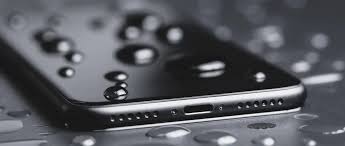
Smartphones have become essential in daily life—used for communication, entertainment, work, and everything in between. But as convenient as they are, they’re not waterproof miracles. One accidental splash or dip in water can lead to distorted audio or completely muted speakers. That’s where Fix My Speaker enters the scene.
In the last couple of years, people have been buzzing about this intriguing yet straightforward tool that claims to eject water from your phone’s speaker grill using sound waves. But how effective is it? And most importantly, is Fix My Speaker genuinely free?
Let’s explore what this tool does, how it works, whether it’s safe to use, and how it compares to other water removal methods.
Understanding Water Damage in Smartphone Speakers
Before exploring Fix My Speaker, it’s crucial to understand how water affects smartphone speakers. While most smartphones today are advertised as “water-resistant,” that doesn’t mean water can’t get trapped in places like the speaker grille.
Once water enters the speaker area:
- Audio can sound muffled or crackly
- Volume might drop noticeably.
- Residual moisture could cause long-term damage.
While most devices dry out on their own, full recovery can take hours—or even days. During that time, your speaker may sound off or be unusable.
That’s where tools like Fix My Speaker come into play. They. They offer a quick solution to expel water using acoustic sound frequencies.
How Fix My Speaker Works
This tool operates on a simple concept: sound waves at a specificc frequency can push water droplets out of tiny speaker grills.
Here’s how it works:
- The user visits the Fix My Speaker website.
- They tap a button to start the sound frequency.
- A buzzing, high-pitched tone begins to play.
- Vibrations from this frequency encourage water to move outward.
- Users often notice droplets forming at the edge of the speaker area.
The process mimics a feature introduced by Apple with the Apple Watch—a sound pulse to eject water. Fix My Speaker adapts that same principle for smartphones through a browser-based tool.
Exploring the Core Feature: Is It Really Free?
A key selling point of Fix My Speaker is its free-to-use model. That’s not just marketing speak—it’s genuinely accessible to anyone without needing to download an app or pay for a subscription.
Here’s what you can expect:
- No app downloads required
- No sign-up or account creation
- No hidden charges
Users simply visit the site and tap the button. This ease of access makes it one of the most user-friendly tools available for an everyday smartphone problem. ixxMy Speaker is absolutely free to use, and that’s one reason why it’s gained popularity so quickly, especially among Gen Z and TikTok users.
Device Compatibility: iPhones, Androids, and More
Another reason for its widespread popularity is the cross-device compatibility.
Because Fix My Speaker runs in your browser, it works on:
- iPhones (all models with external speakers)
- Android smartphones (Samsung, Pixel, Xiaomi, etc.)
- Tablets and even some laptops
The tool can operate effectively as long as the device has a speaker and an internet browser. There is no need to worry about OS requirements or storage limitations.
Evaluating the Safety of Using Sound Ejection
One of the most frequent concerns users have is whether this type of tool is safe for their devices.
Let’s break it down:
What Happens Physically?
When the tool plays a sound at a specific low-frequency range (usually around 165Hz), it creates vibrations. These vibrations cause the speaker diaphragm to oscillate, which in turn nudges water droplets outward.
Any Risk of Damage?
For most devices, this type of audio is harmless, as long as it’s not played for extended periods at maximum volume. Overuse could lead to overheating or speaker stress, but using it in short bursts is generally safe.
Still, it’s best to follow a few precautions:
- Don’t crank up your volume to 100% immediately.
- Don’t repeat the process dozens of times in a row.
- Avoid using the tool if your phone is already experiencing overheating.
When used responsibly, Fix My Speaker is a low-risk and high-reward solution.
Step-by-Step Guide to Using the Tool
Using Fix My Speaker is incredibly straightforward. But for anyone new to it, here’s a quick walkthrough:
- Open your phone’s browser (Chrome, Safari, etc.).
- Search for “Fix My Speaker” or go directly to the website.
- Tap the play button on the site labeled “Eject Water.”
- Allow the sound to play for 10–30 seconds.
- Watch for droplets near the speaker grill.
- Repeat if necessary, but take breaks between cycles.
You can also gently shake the phone (with the screen facing downward) to help dislodge trapped moisture.
Compared to Other DIY Water Ejection Methods
Over the years, smartphone users have tried all sorts of creative and not-so-safe ways to get water out of their speakers. How does Fix My Speaker stack up?
| Method | Effectiveness | Risk Level | Cost | Ease of Use |
| Fix My Speaker | High | Low | Free | Very easy |
| Rice bag drying | Low to medium | Low | Cheap | Slow |
| Compressed air | Medium | Medium | Moderate | Tricky |
| Physical tapping | Low | Medium | Free | Inconsistent |
| Apple Watch-like sound tool | High | Low | Device-specific | Simple |
Fix My Speaker lands at the sweet spot of being free, fast, and relatively risk-free.
TikTok’s Role in Popularizing the Tool
Part of what made Fix My Speaker go viral was its explosion on TikTok and Instagram Reels. Users began posting “before and after” videos showing water droplets pushed out by the sound frequency.
The appeal?
- It’s visual and satisfying to watch
- It feels like a life hack.
- It solves a real problem with zero cost..
As a result, it caught the attention of tech influencers, content creators, and even casual users looking for a quick fix.
Key Benefits at a Glance
Let’s summarize what makes Fix My Speaker a standout tool:
- 100% Free to Use
No subscription, paywall, or ads to navigate. - Instant Access via Web
No installations, no permissions, no waiting. - Safe for Most Devices
When used correctly, it doesn’t harm your phone. - Proven Effective by Thousands
Real testimonials and videos show genuine results. - Cross-Platform Compatibility
Works on both iPhones and Androids, among others.
When It Might Not Work
Despite its success, there are situations where Fix My Speaker might not deliver perfect results:
- Heavy water damage: If your phone was fully submerged or left in water for a long time, the internal components might be affected beyond what a sound tool can fix.
- Speaker corrosion: Over time, water can cause corrosion inside the speaker system, which isn’t reversible with sound.
- No sound output: If your speaker is entirely silent, the tool can’t emit the necessary frequency.
Tips for Preventing Future Water Damage
While tools like Fix My Speaker are helpful, prevention is even better. Here’s how to protect your speaker system going forward:
- Use waterproof cases or pouches when near water.
- Avoid using your phone in the bathroom during showers.
- Don’t place your phone face-up on wet surfaces.
- Get a Bluetooth speaker for beach or pool use.
If you know you’ll be around water, switching your phone to airplane mode and turning off the sound can also help prevent issues if it does get wet.
Conclusion
Fix My Speaker offers a surprisingly effective, free solution to a problem that plagues even the most premium smartphones. By using carefully tuned sound frequencies, it can push water out of your device’s speaker without causing damage or requiring technical skills.
For everyday users who want a quick, accessible fix without downloads or fees, this tool is a smart first step before trying riskier or more expensive options.